Export
Turn a project's cleaned files into one file you can use: for a search index, for a colleague, or for training a model.
Build an export
Choose Export along the top of the project.
Choose the kind of export.
Set its options, if you need to.
Press Build and download.
Agnos saves the file to your downloads. It also stays under Exports from this project for 24 hours, so you can download it again from there.
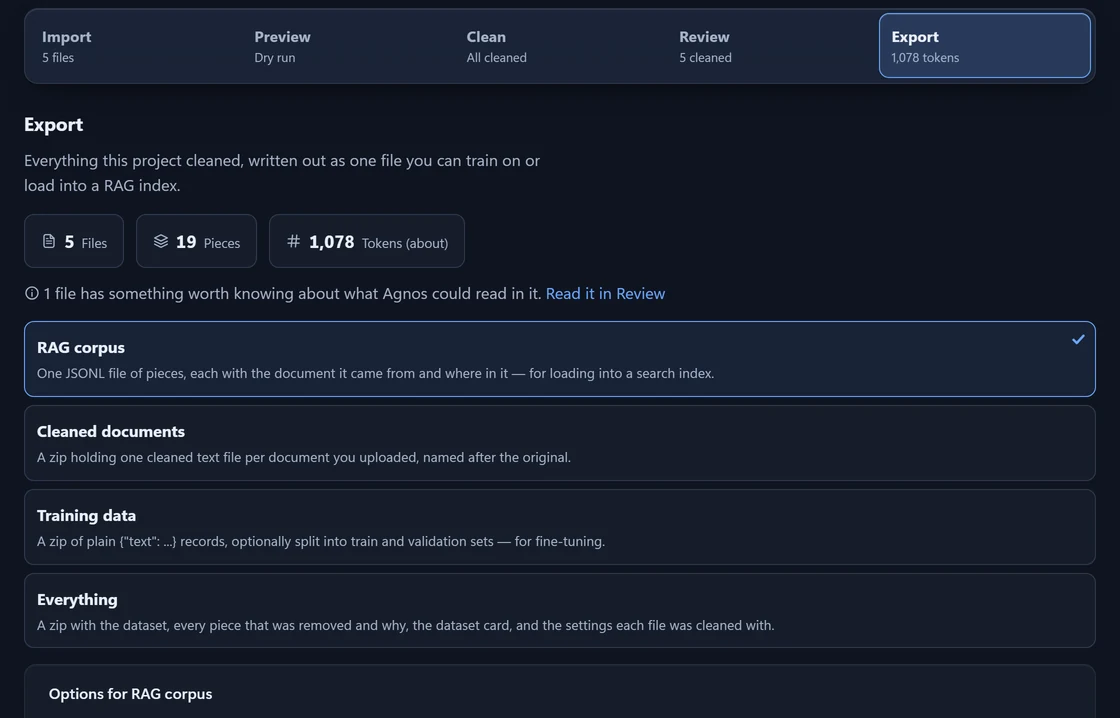
Kinds of export
| Kind | You get | Made for |
|---|---|---|
| RAG corpus | One JSONL file (one record per line) of pieces, each with the document it came from. | A search index. |
| Cleaned documents | A zip with one cleaned text file per document. | People and other tools. |
| Training data | A zip of text-only records, optionally split into training and validation sets. | Fine-tuning a model. |
| Everything | A zip with the dataset, every removed piece and why, a dataset card, and the settings used. | A full record of the cleaning. |
What is inside each file is in Export formats.
What goes in
An export takes every Ready file in the project, or only the files you ticked on Import. Your choices in Review are applied.
Notes under the numbers flag anything that changes the result, such as files cleaned with older settings or a file Agnos could not read in full. Files cleaned with older settings are exported as they are, unless you press Clean them again first.
When the token count says “about”, some of it is estimated from the length of the text.
Options
Each kind of export shows only the options that apply to it.
| Option | What it does | Applies to |
|---|---|---|
| File name | The name of the file, agnos-dataset unless you change it. | All |
| Text found in more than one file | What happens to a passage found in several files. See below. | All |
| Minimum quality | Leaves out pieces that score below this value. Off by default. | RAG corpus, Training data, Everything |
| Token ids | Adds each piece's token numbers. Only useful if you train with the tokenizer (the tool that splits text into tokens) the project counts with. Makes the file larger. | RAG corpus, Everything |
| Validation split | The share of files held back to test a trained model, from 0 to 0.9. | Training data, Everything |
| Seed | The same seed gives the same split. 42 unless you change it. | Training data, Everything |
Repeated text
- Keep every copy
- Nothing is removed for repeating. The default for Cleaned documents, because two documents that share a paragraph are still two documents.
- Keep one copy
- Text found word for word in several files goes in once, from the first file. The default for the other kinds.
- Keep one copy, counting near matches
- Passages that are at least 90% alike count as the same. Only passages of 12 words or more are compared.
Text that differs in its numbers is never a repeat. Text rewritten in other words, translated or summarised is not matched.
Minimum quality
Every piece has a quality score from 0 to 1 for how clean and readable it is. The line under the slider says how many pieces a value would leave out.
Validation split
Agnos splits by file, not by piece. Files that share identical or nearly identical text stay on the same side, so the same passage is not in both sets. If the files cannot form at least two such groups, the split is refused.
After the trial
During the 14-day trial every kind of export works. After it, exporting needs a licence; your projects, cleaning and Review keep working, and nothing is deleted.
Enter your key on the Licence page and you can export straight away. See Pricing and Trial and licences.
Something here wrong or unclear? Tell us and we will fix the page.